
Social media privacy isn’t just about embarrassing posts
Updated Sept. 4, 2025, at 1:45 p.m. CT
About 64% of the world’s population uses social media today, according to a 2025 Statista report. Facebook, Instagram, TikTok, Snapchat and newer platforms like Threads have become part of our daily lives. But while these apps make it easy to stay connected, they also make it easier for fraudsters to learn about us.
Every status update, quiz or photo you post can reveal details scammers may use to steal your identity.
“People are more focused on those selfies or posting in the moment than thinking about how the information they’re sharing can be used against them,” said Kevin Cray, vice president, software development at Dupaco Community Credit Union.
The good news? A few simple habits can make a big difference in protecting your social media privacy (and your identity).
Think twice about quizzes
Sure, those online quizzes can be entertaining. How else would we know which TV character we’re most like?
But what happens with those answers once the quiz is done? Could they be stored, sold or even used to guess your passwords? Definitely, Cray said.
Fraudsters often use quiz responses to answer common security questions—like your first car, your pet’s name or your favorite teacher—and gain access to your accounts.
“I’m not saying you have to avoid these quizzes altogether. But be mindful of the risks,” he said. “If you see a quiz question that looks like one of your account security questions, you may want to skip it.”
Give your accounts a regular checkup
Social media settings change frequently. Make it a habit to review your privacy settings, followers and connected apps at least every three months. You’ll want to:
- Unfriend or unfollow strangers: If you don’t recognize someone, remove them.
- Set profiles to private: Limit who can see your posts to people you know and trust.
- Review third-party apps: Remove old apps connected to Facebook, Google or TikTok that no longer need access.
- Check location settings: Turn off automatic location tagging to avoid oversharing where you are.
If you want a public following—for a side business, product or creative brand—consider using two accounts: One private for personal use and one public for business.
“The only way to keep your information private is to keep it off social media,” he said. “But these steps can help protect your identity.”
Hold off on posting
It’s tempting to post in the moment. But doing so can make you more vulnerable.
“While it’s fun for your followers to see you hanging out in Chicago for the weekend, you’ve also told everyone your home might be empty,” Cray said.
These tips can help you stay safer:
- Post vacation photos after you return.
- Avoid sharing photos of boarding passes, tickets or valuables.
- Double-check the background of your photos—sometimes they reveal addresses, license plates or other personal details.
Remember: Every photo you share tells people more about your life than you might realize.
Convenience isn’t always better
Ever see “Log in with Facebook” or “Continue with Google”? It’s fast—but not always safe.
When you log in through a social account, you’re often giving that app or website permission to access your information. That might include your name, email, contact list or even the ability to post on your behalf.
Instead:
- Read permission requests carefully.
- Use email logins or password managers instead of social logins when possible.
- Regularly review which apps have access to your social profiles and revoke ones you don’t use.
Take advantage of added security
One of the most effective ways to protect your accounts? Enable two-factor authentication.
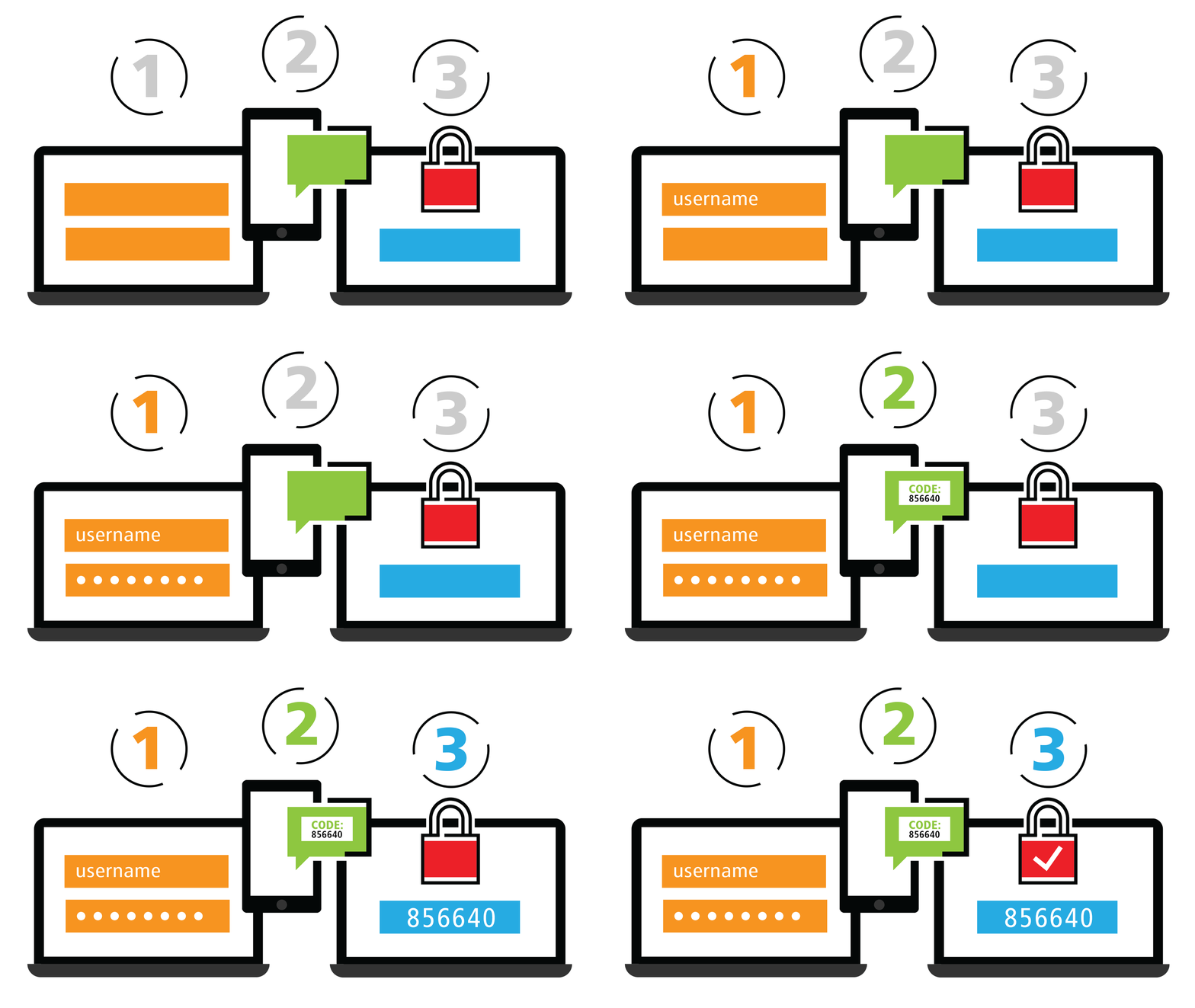
“It’s an extra layer of security designed to make sure you’re the only person who can log in to your account—even if someone knows your password,” Cray said.
Here’s how it works:
- You log in with your password.
- You confirm your identity with a code sent by text, email or an authentication app.
Are you using strong passwords? >
Many platforms also support passkeys—a new, password-free way to log in that’s even harder for hackers to crack.
Here’s how to use two-step verification >
Protecting your privacy protects your money
Oversharing online isn’t just about likes or followers—it can open the door to identity theft and financial fraud.
By taking a few extra minutes to review your settings, think twice before posting and enable stronger logins, you can help safeguard your personal information.
Bottom line: A little caution goes a long way. Protecting your social media privacy today means fewer risks tomorrow.